


Every call. Every chat. One console.
Voice, WhatsApp, Messenger, Instagram and email in one platform, with supervision, reports and a direct line to your service desk. Built and supported by iSoft in Luanda.
From first ring to resolution
Call Links brings voice campaigns, WhatsApp, Messenger, Instagram and email into one agent console, with real-time supervision, reports, quality audits and a direct line to your service desk. It runs in your own data centre, in Portuguese, Spanish or English.
Voice
Inbound calls, outbound campaigns and IVR on your own trunks.
Messaging
WhatsApp, Messenger, Instagram and email in one inbox.
Supervision
Real-time wallboard, follow-up and quality audits.
Integration
Service desk, CRM and your own systems.
Discover GrandLinks ITSM11 modules. One console.
Choose a module to see its screen and what it does.
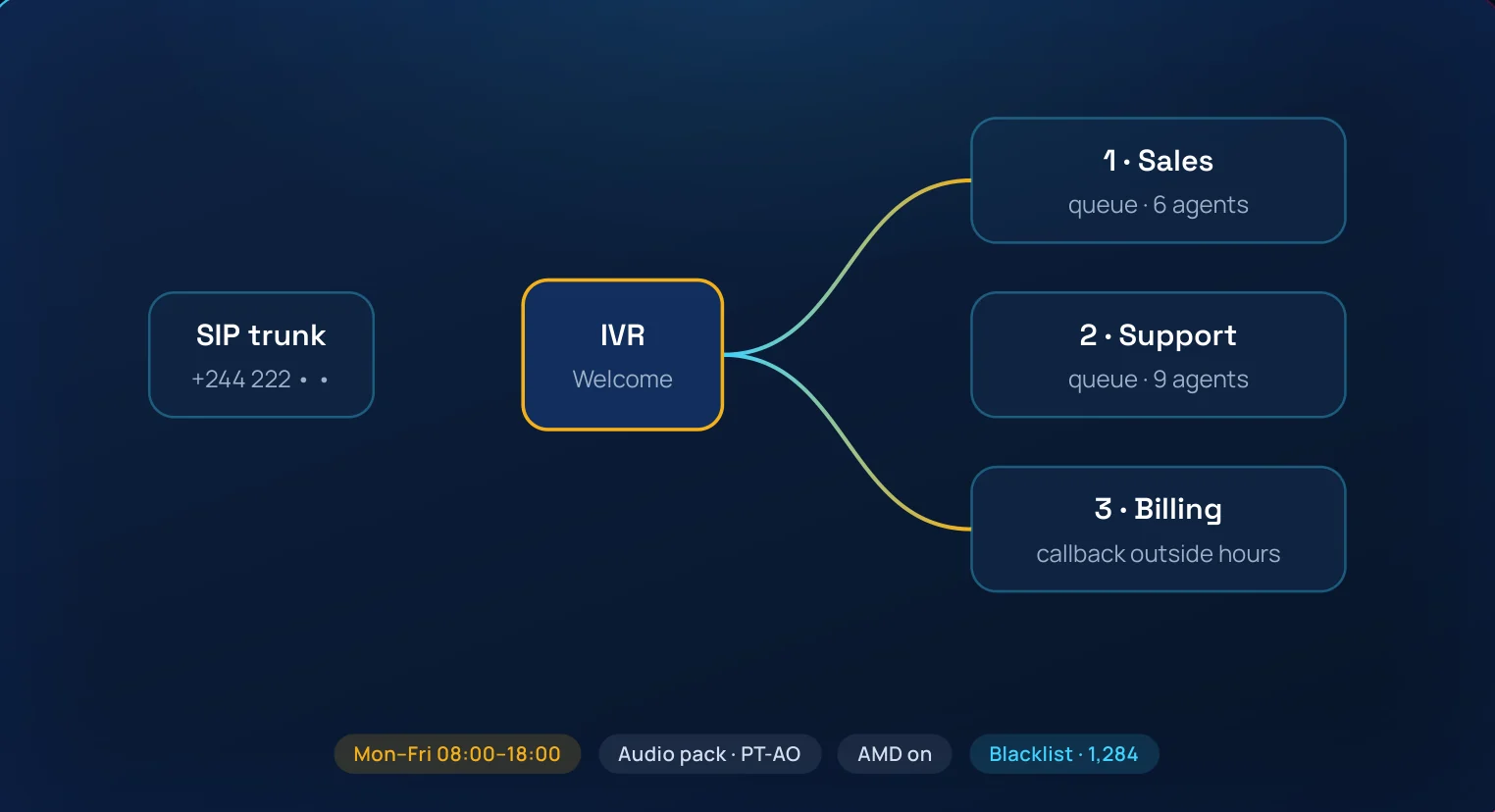
Inbound voice & routing
Every call reaches the right team, first time.
SIP trunks, inbound and outbound routes, IVR menus, time conditions and custom destinations are set up from the same set of screens. Official audio packs in Portuguese, Spanish and English, music on hold and answering machine detection come ready to use.
What you get
- Multi-level IVR, time conditions and caller identification.
- Blacklists and do-not-call rules applied before the call rings.
- Pause reasons, queue priorities and recording format per campaign.
Business value Less waiting, fewer transfers and the same service in and out of office hours.
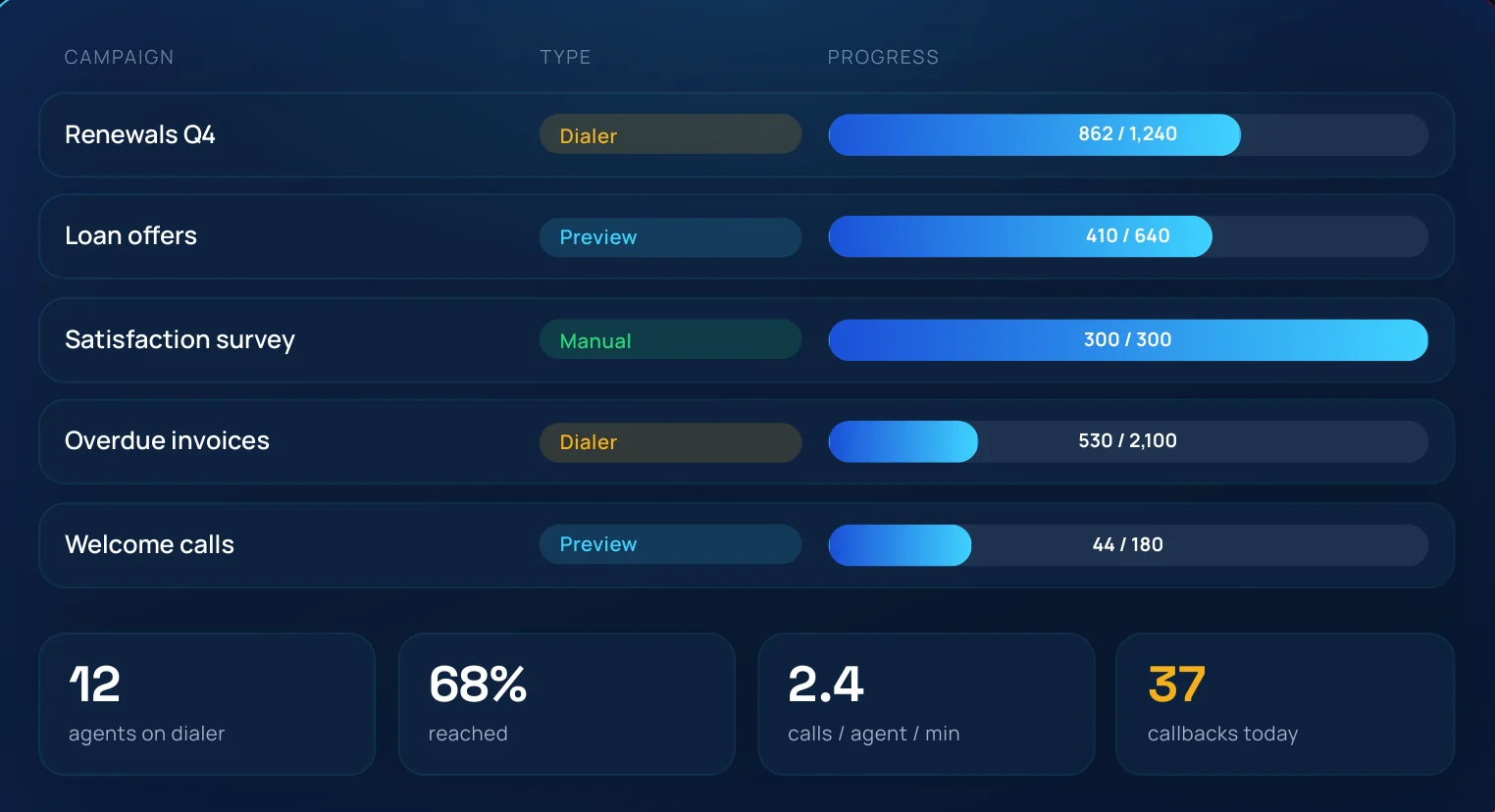
Outbound campaigns & dialer
Manual, preview or dialer: the campaign type that fits the list.
Contact lists are imported from CSV files, with numbers cleaned and duplicates checked. Campaigns start from reusable templates: a new product launch inherits the queue, dispositions, forms and agents in a few clicks.
What you get
- Predictive and progressive dialer, with pacing per campaign.
- Preview mode shows the contact record before the call starts.
- Scheduled callbacks and rules for busy or unanswered numbers.
Business value More conversations per agent hour, with the list, the script and the outcome in one place.
Agent console
A complete workstation in the browser, with no desk phone.
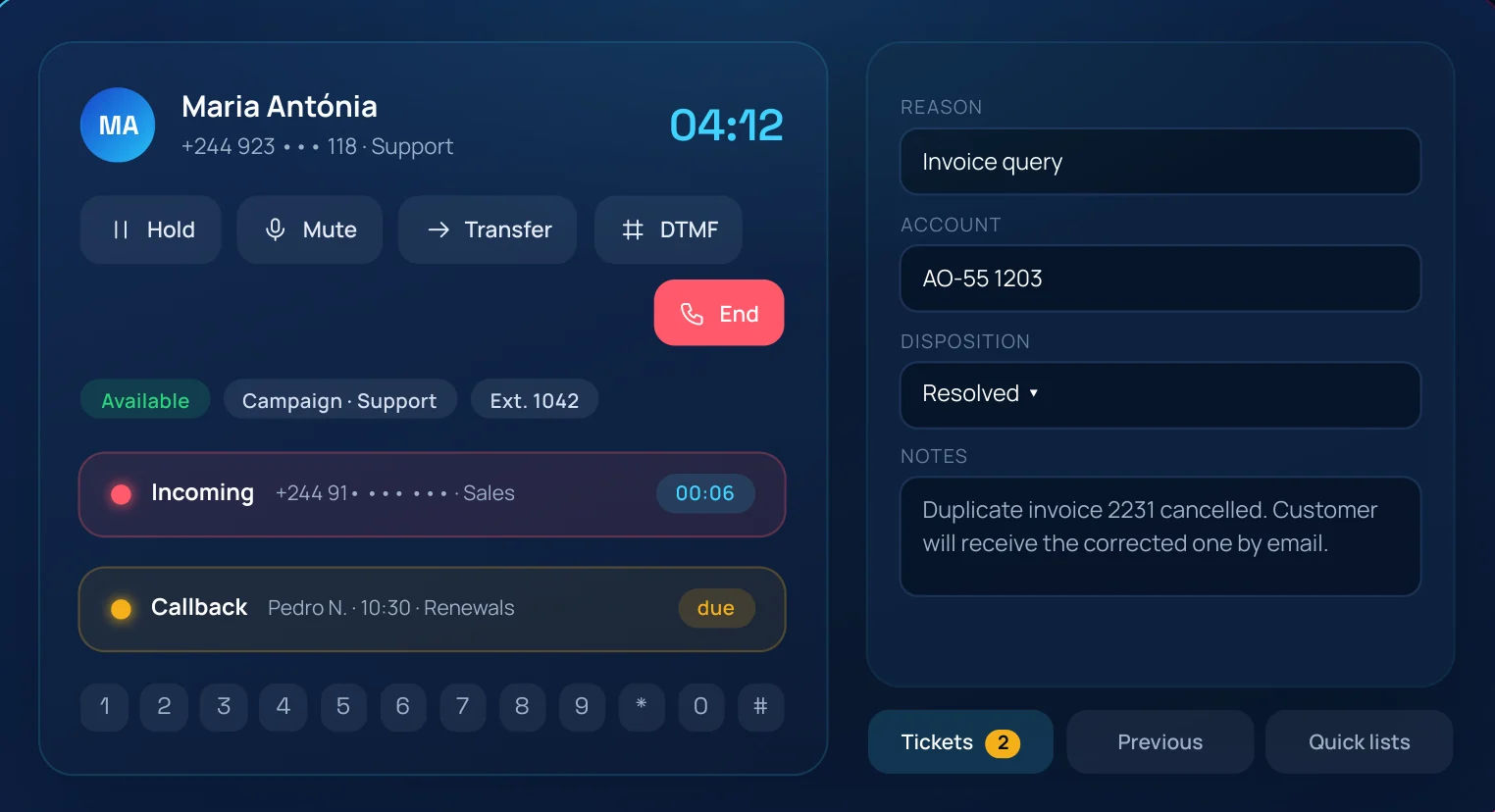
Agents sign in and the WebRTC softphone registers by itself. Keypad, answer and reject, hold, mute, transfer and DTMF sit next to the call form, the disposition list and the quick lists used for transfers. Tickets and past conversations open on the right of the screen.
What you get
- One screen for voice, WhatsApp, Messenger, Instagram and email.
- Quick lists of up to 5,000 numbers for one-click transfers.
- Callbacks, pauses and assigned campaigns always in view.
Business value Faster handling and shorter training: everything the agent needs is one click away.
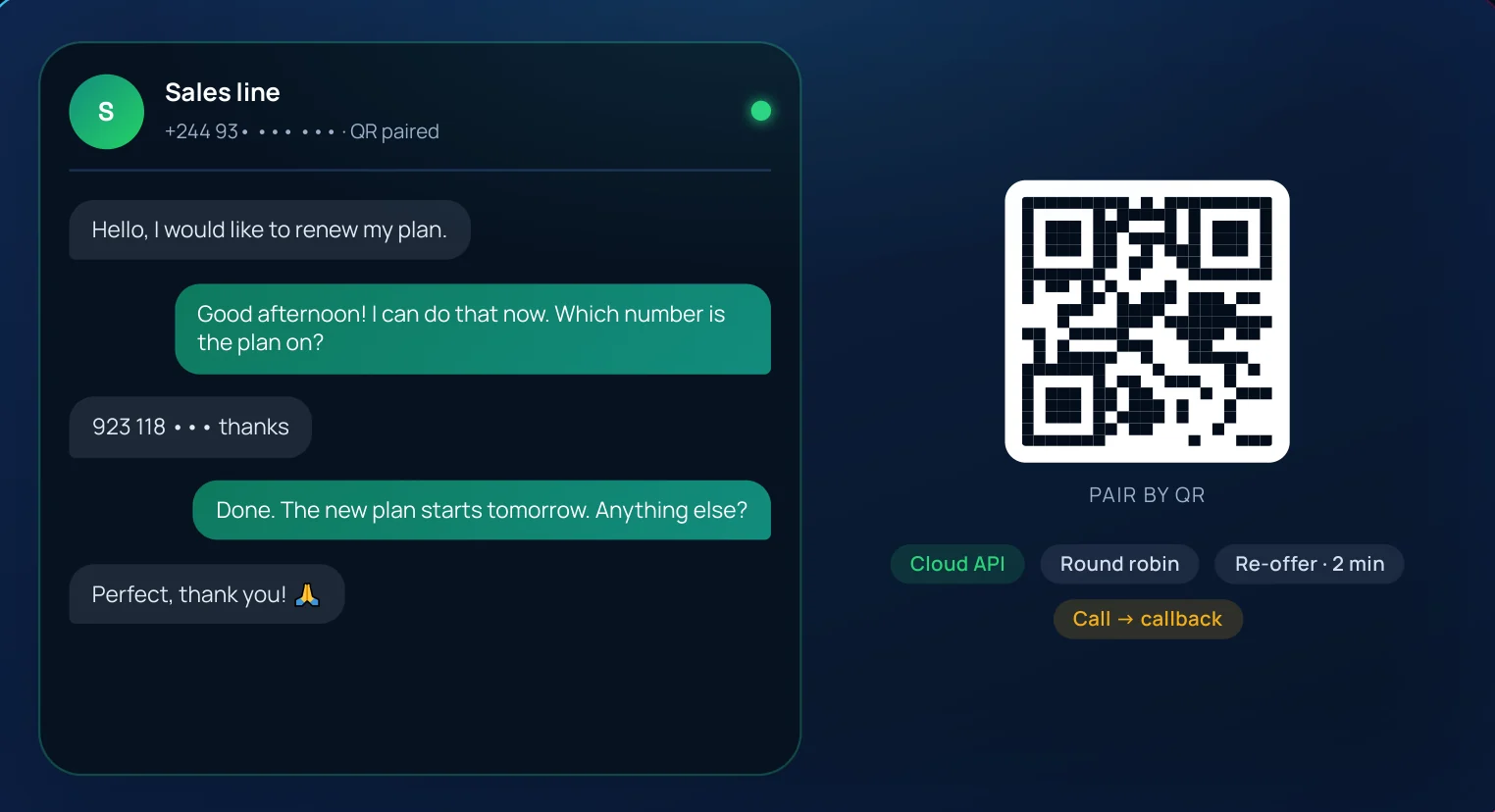
Official cloud API or a regular number linked by QR code.
Connect a line through the Meta Cloud API, with approved message templates, or link an existing number by scanning a QR code, with no middleman provider. Conversations are assigned to an agent according to the campaign strategy and offered again after two minutes without a reply.
What you get
- Text, images, documents and audio in both directions.
- On QR-linked lines, agents start or reopen conversations with free text.
- Voice calls to the line are declined and automatically become callbacks.
Business value Serve customers on the channel they already use, with the same queue rules as voice.
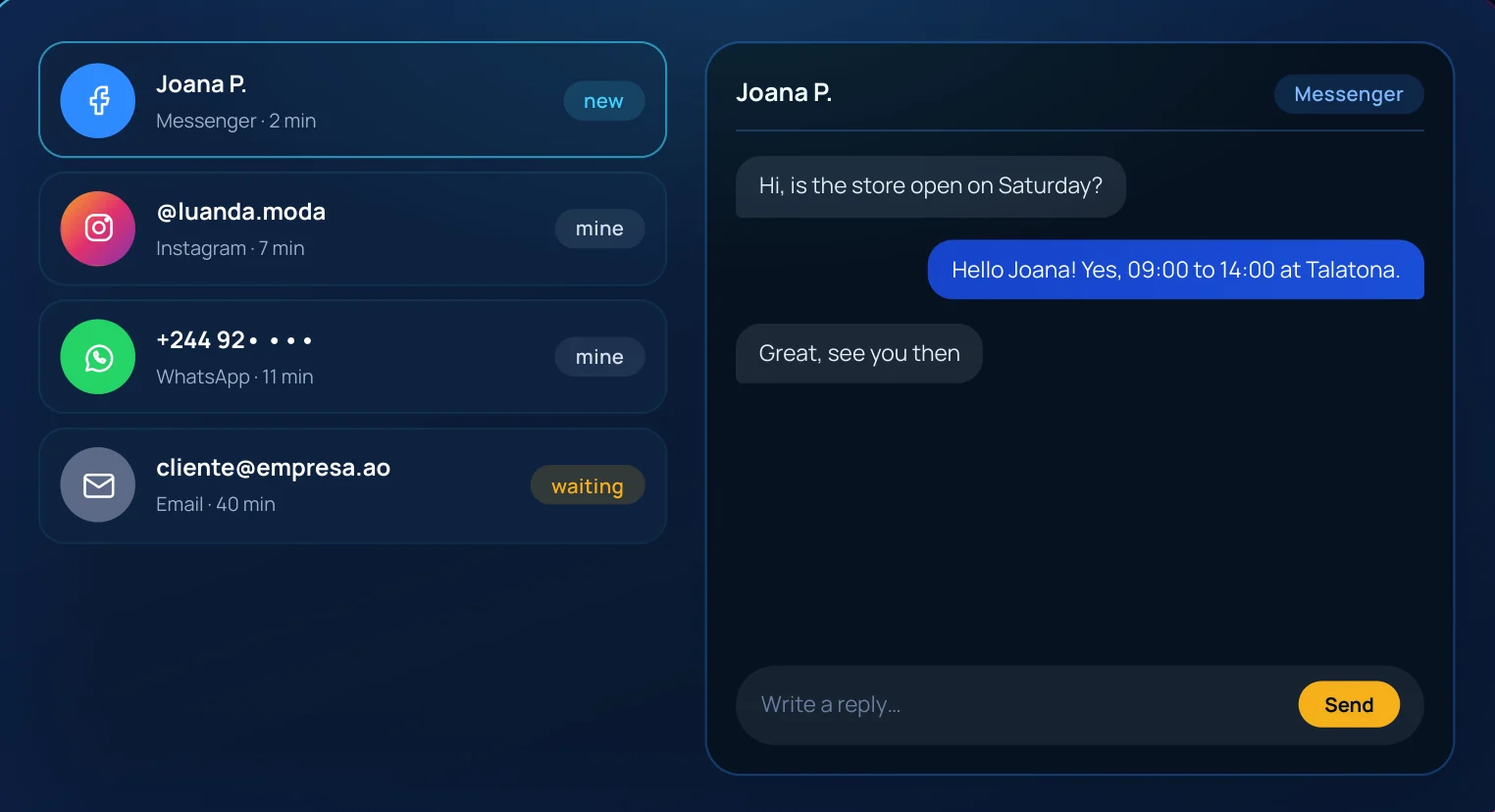
Messenger & Instagram
Social media conversations in the same inbox as everything else.
Facebook pages and Instagram accounts connect through the official Graph API. Messages reach the agent console with the contact history, are assigned like any other conversation and appear in the reports with the same metrics.
What you get
- Several pages and accounts per campaign.
- Replies with text and media, within each platform's messaging windows.
- Every conversation stored and searchable for quality review.
Business value One team answers social media with the discipline of a service desk, instead of a shared phone.
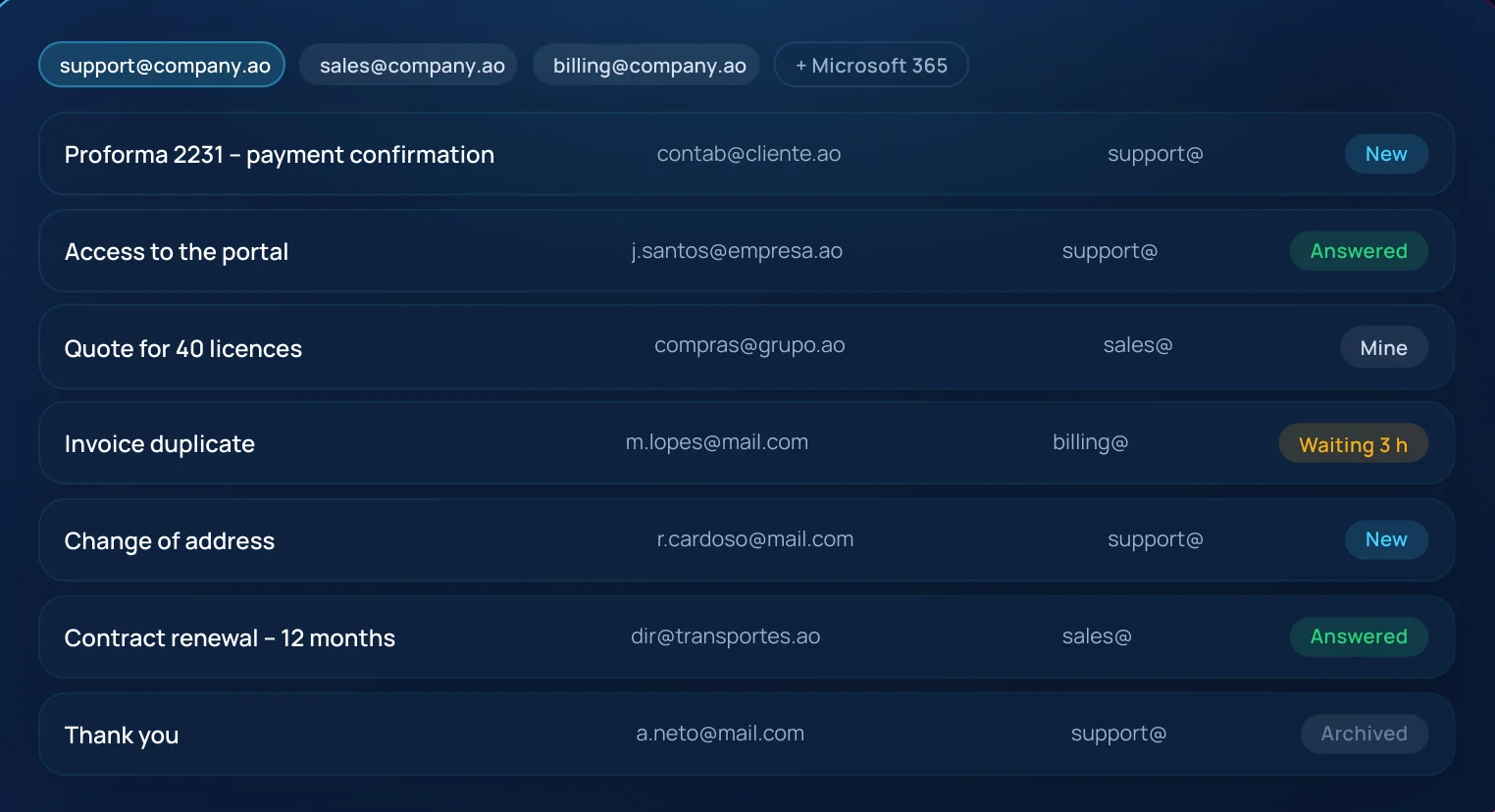
Mailboxes handled as queues, not as inboxes.
Several mailboxes can feed one campaign over IMAP and SMTP, including Exchange and Microsoft 365 with modern authentication. New messages are assigned to agents and answered with a template or free text, and closed emails move to the mailbox's Archive folder.
What you get
- Shared support, sales and billing mailboxes in one campaign.
- Archive-on-close keeps Outlook and Call Links in sync.
- The follow-up board shows the emails waiting for a reply, and for how long.
Business value No lost emails and no double replies, with every reply time measured.
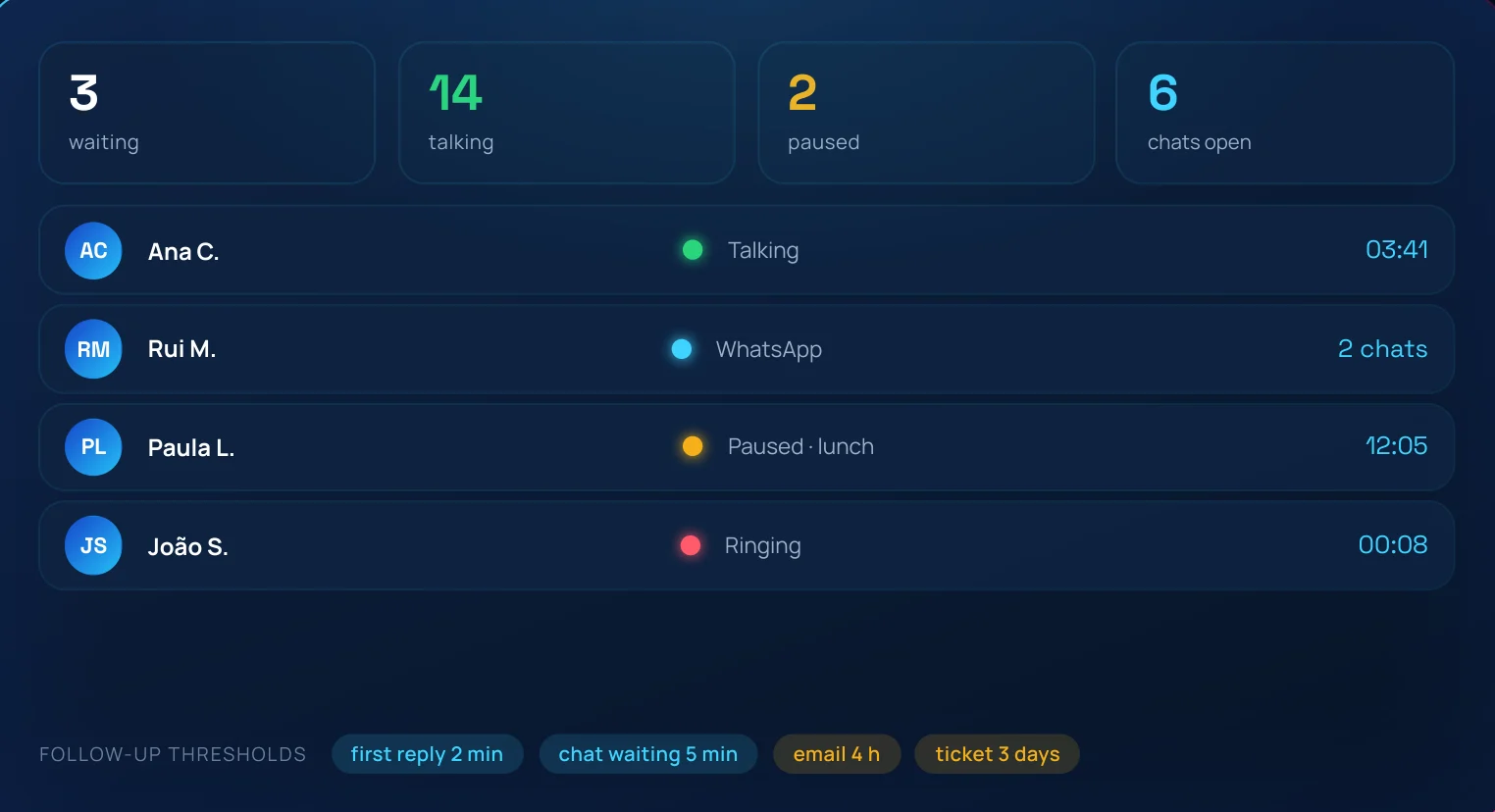
Live supervision & follow-up
See the contact centre in real time and act before customers notice.
The dashboard and real-time wallboard show queues, agent status and waiting contacts across every channel. The follow-up page lists unanswered conversations, overdue callbacks and open tickets per agent, measured against the delay limits set by the administrator.
What you get
- Listen, whisper and barge in on live calls.
- Limits for first reply, waiting conversations, emails and tickets.
- Per-agent view of open work across every channel.
Business value Supervisors manage by exception, with the facts in front of them.
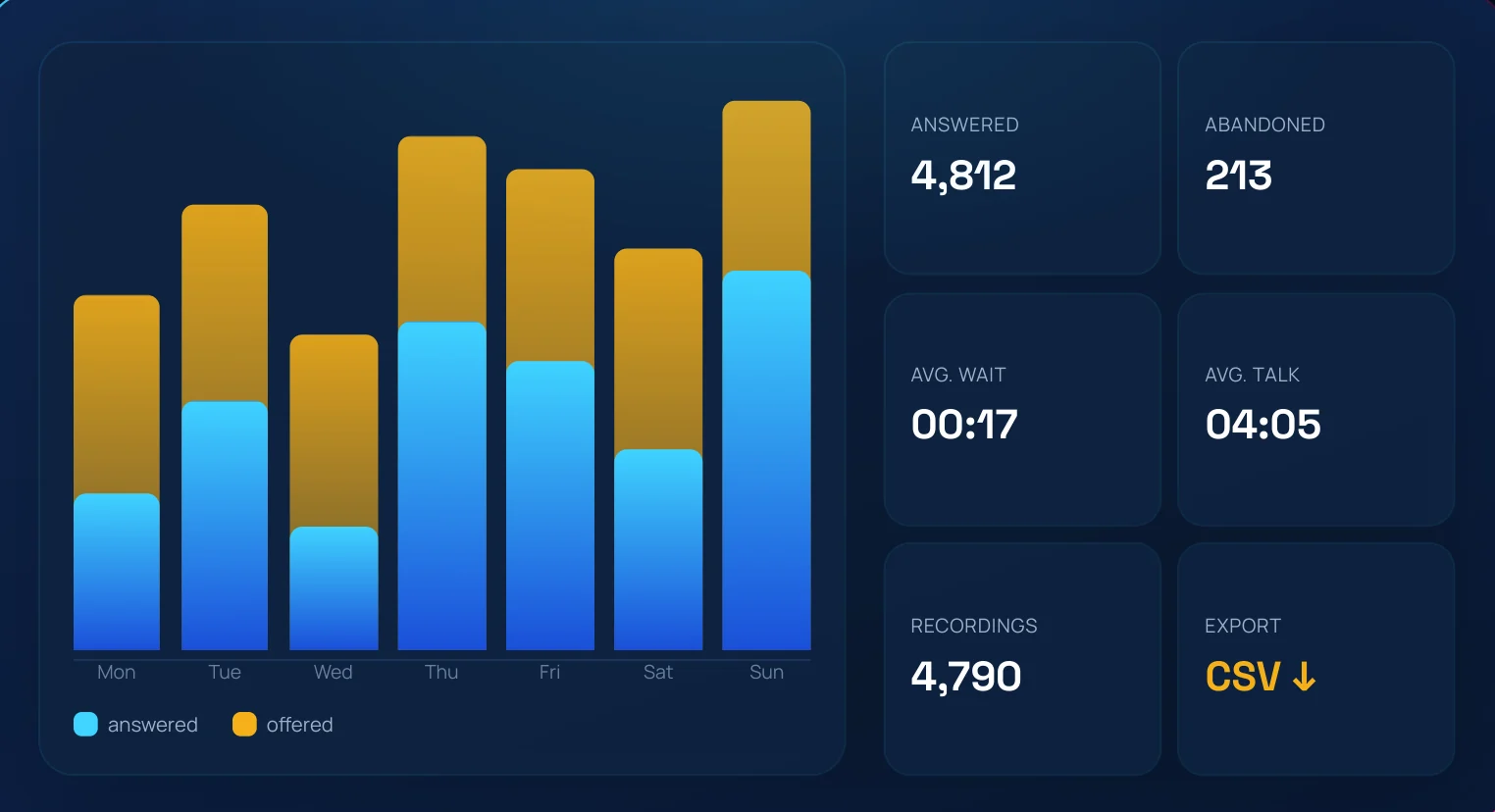
Reports & recordings
Every metric the operation needs, ready to export.
Reports cover calls, agents, campaigns, dispositions, dialer and channel activity, telling missed calls apart from rejected ones. Recordings are searched by date, campaign, agent, number or disposition, and played or downloaded in the browser.
What you get
- Daily, weekly and custom periods, with CSV export.
- Dialer board with answered, busy, unanswered and callback contacts.
- Recording retention and format set per campaign.
Business value Management decisions made on the same numbers the team sees every day.
Forms, dispositions & audits
Record the outcome of every contact and check its quality.
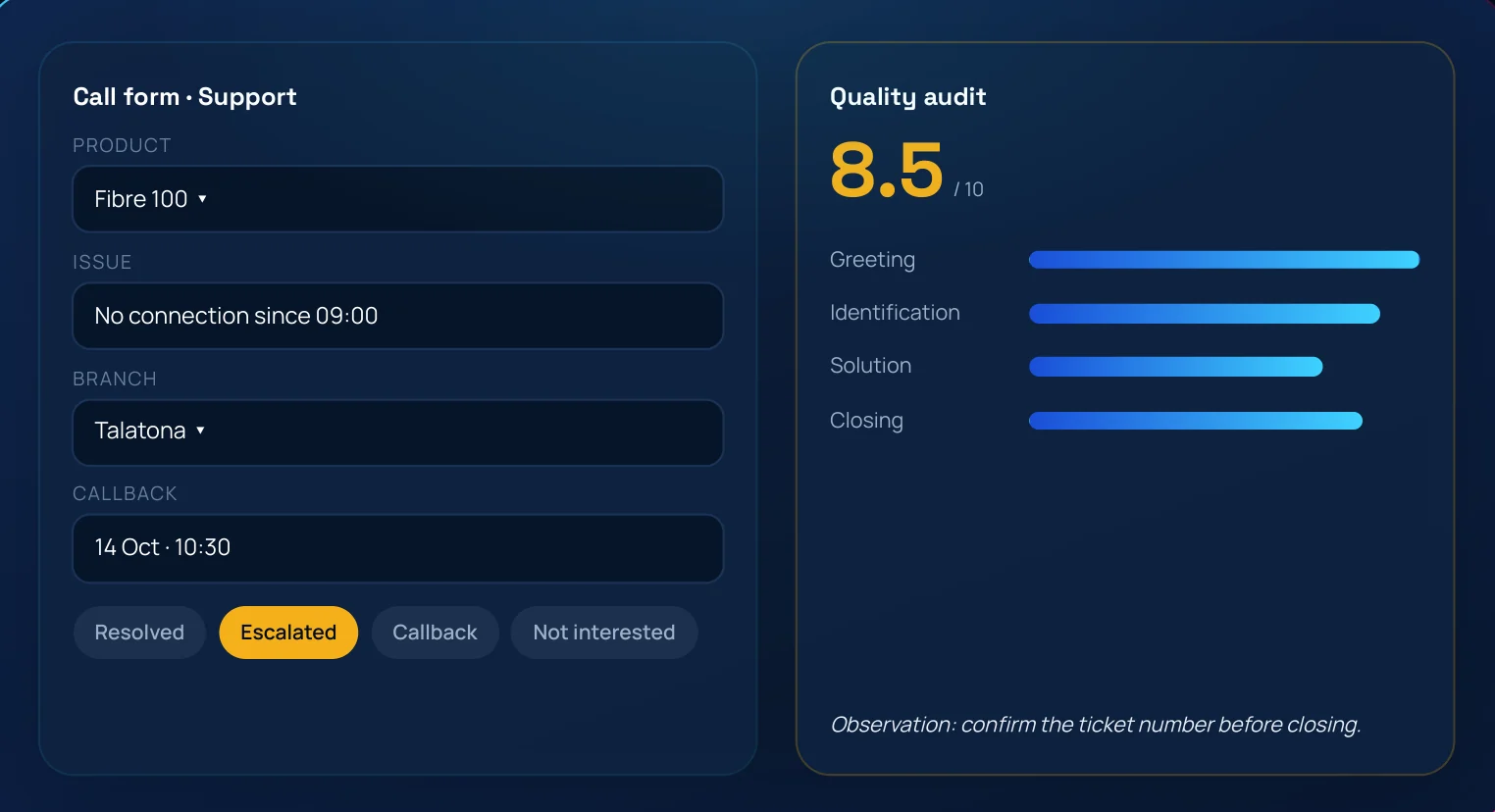
Campaign forms have text, number, date and dynamic list fields and appear during the call. Dispositions classify the contact, open a form or schedule a callback, and quality auditors score them with a grade and notes the agent sees in My forms.
What you get
- Form answers linked to the recording and the contact record.
- CRM integration: open the customer page or send the call data to your system.
- Audits restricted to administrators and managers.
Business value Clean data at the end of every contact and a quality loop that closes.
Tickets & GrandLinks ITSM integration
A ticket opened during the call and followed up after it.
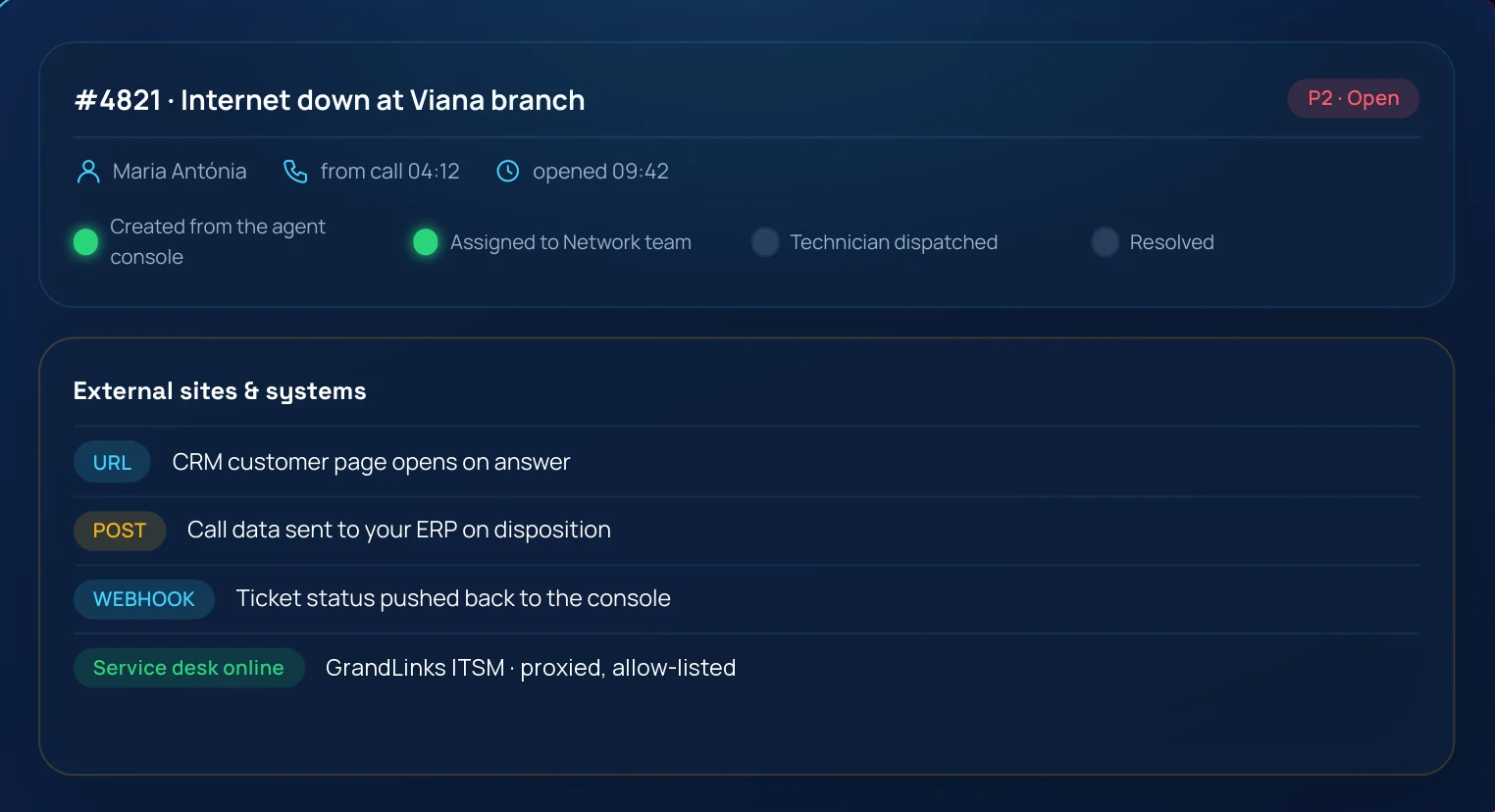
Agents open tickets in GrandLinks ITSM without leaving the console. The ticket stays linked to the contact and the conversation, its status is visible in Call Links, and service desk users are managed from the same screens. External sites and systems connect any CRM by URL or webhook.
What you get
- Ticket list and detail, with the status updated from the service desk.
- The follow-up board flags tickets that have passed their limit.
- Proxied, allow-listed integration: credentials never reach the browser.
Business value Customer requests become tracked work instead of notes on paper.
Administration & security
Set up in hours, governed for years.
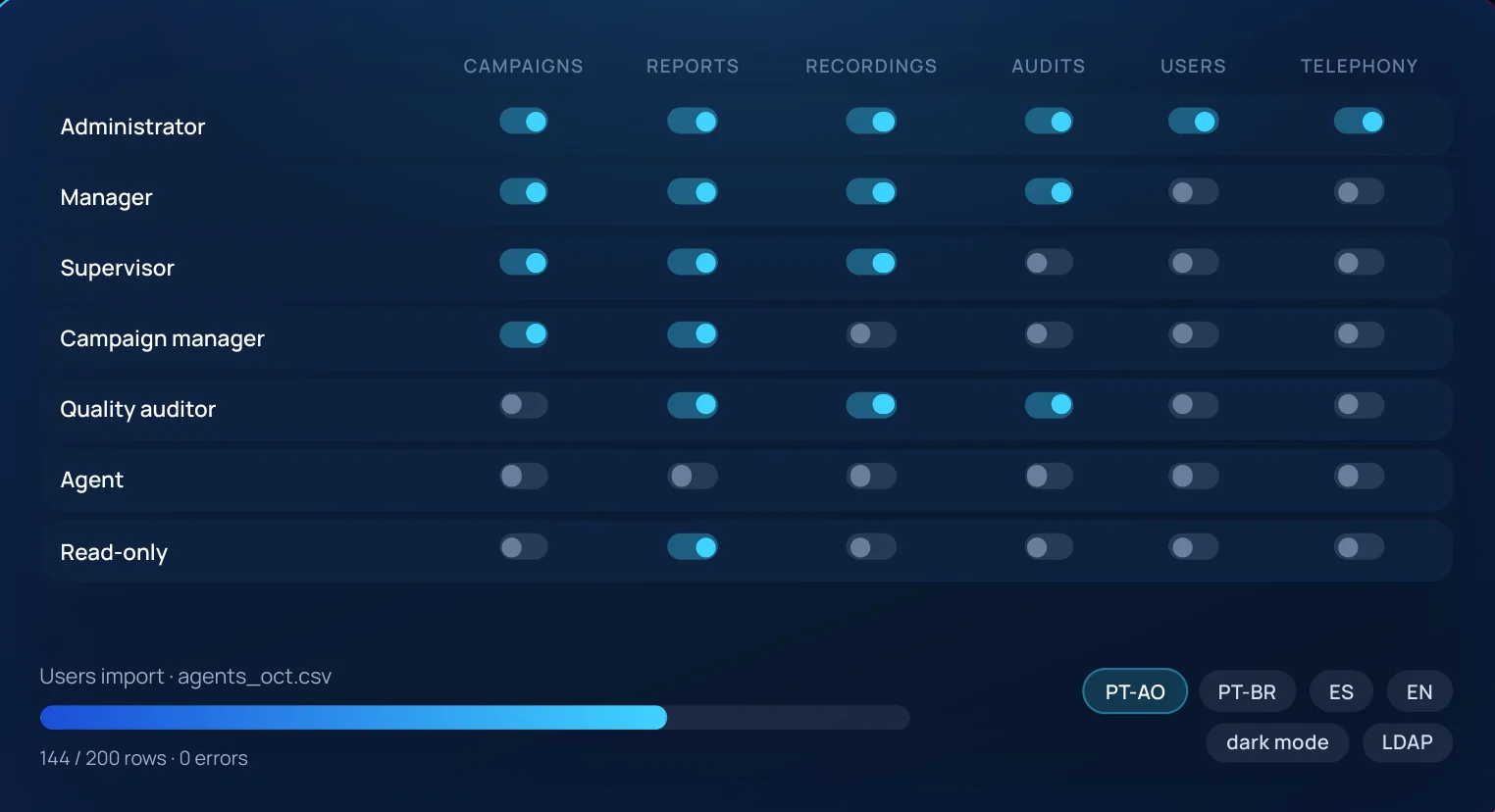
Users and agents are created one by one or imported from CSV, grouped and assigned to roles with clear, grouped permissions. Every page and every API route is checked against the role, and the built-in roles are protected. The interface works in Portuguese (Angola and Brazil), Spanish and English, in light or dark mode, with your logo and colours.
What you get
- Security audit log and external authentication (LDAP).
- Bulk user import, export and deletion.
- Installed on your servers with Docker: the data stays in your data centre.
Business value Control who sees what, prove it, and keep the platform under your governance.
What you can do with Call Links
A few ways to use Call Links in the daily work of a contact centre.
Customer support line
A voice menu routes each call to sales, support or billing; out of hours, the call becomes a callback.
Renewals, sales and welcome calls
Dialer or preview campaigns, with the script, the form and the outcome on the same screen.
Overdue invoice collection
The dialer works through the list, retries busy or unanswered numbers and records the outcome of every contact.
Satisfaction surveys
Campaigns with their own form, with the answers linked to the recording and the customer record.
WhatsApp and social media
Requests that arrive by WhatsApp, Messenger, Instagram or email join the same queues as calls.
Faults with a ticket
A fault reported on a call becomes a ticket in GrandLinks ITSM, assigned to the technical team and followed up to resolution.
Technical data sheet
- Channels
- Voice (SIP), WhatsApp (Meta Cloud API or a number linked by QR code), Messenger, Instagram and email (IMAP and SMTP, including Exchange and Microsoft 365).
- Telephony
- SIP trunks, inbound and outbound routes, multi-level IVR, time conditions, music on hold, answering machine detection and audio packs in Portuguese, Spanish and English.
- Campaigns
- Manual, preview and predictive or progressive dialer; lists imported from CSV; reusable templates; scheduled callbacks.
- Agent workstation
- In the browser, with a WebRTC softphone and no desk phone; quick lists of up to 5,000 numbers.
- Supervision
- Real-time wallboard; listen, whisper and barge in on calls; follow-up limits set by the administrator.
- Reports & recordings
- Calls, agents, campaigns, dispositions, dialer and channels; CSV export; searchable recordings, with retention set per campaign.
- Quality
- Forms per campaign, dispositions and audits with a grade and notes.
- Integrations
- GrandLinks ITSM; CRM and ERP by URL, POST or webhook, through an allow-listed proxy.
- User roles
- Administrator, manager, supervisor, campaign manager, quality auditor, agent and read-only.
- Security
- Permissions checked on every page and every API route; security audit log; LDAP authentication.
- Deployment
- Docker on your servers, hosted by iSoft in Angola, or hybrid.
- Languages and branding
- Portuguese (Angola and Brazil), Spanish and English; light and dark mode; your logo and colours.
- Licensing
- Per concurrent agent; project, subscription or managed service.
Delivery with clear criteria
Discover
Channels, queues, teams, numbers and the systems to connect.
Configure
Campaigns, IVR, forms, dispositions, roles and your branding.
Connect
SIP trunks, WhatsApp lines, social media accounts, mailboxes and the service desk.
Go live
Agent training, supported first days and the metrics to watch.
What you receive
Configured campaigns
Queues, IVR, forms, dispositions and roles ready on day one.
Training
For agents, supervisors and administrators, in Portuguese.
Runbook and backups
Operations guide, backup plan and restore test.
Support agreement
Updates and a named iSoft contact.
Where Call Links runs
Licensed per concurrent agent. Project, subscription or managed service: the model is set in the proposal.
On your servers
Docker platform in your data centre. Data, recordings and conversations never leave your network.
Hosted by iSoft
Run by iSoft in Angola, with daily backups and monitoring.
Hybrid
The platform on your servers; WhatsApp and social media connected through the iSoft public endpoint.
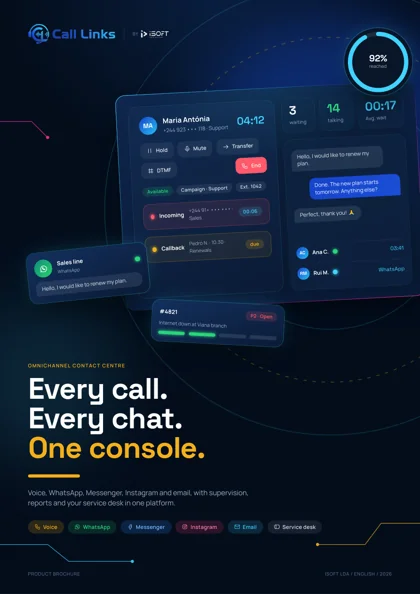
Call Links brochure
The 11 modules, delivery and deployment options in a 16-page document, in English.
Call Links: product brochure
Modules, channels, supervision, integrations, delivery and deployment options.