

iSoft Document Management System
Organize, Store, Track & Manage Documents
Software solution designed to organize, store, track, and manage electronic documents in your organization. Clearly organized and instantly available information is the key to successful business processes.

Powerful Capabilities
Everything you need to transform your document management

Secure Storage
Store documents safely in one centralized platform.
Clear Organization
Documents are structured using smart index data.
Productive Workplace
Archive, search, track, and collaborate efficiently.

Flexible Access
Work seamlessly from anywhere, anytime.
ISOFT DMS at work
Real ISOFT DMS screens.
Files and folders
All your documents in one organised place, with personal folders, team folders, recent files and favourites. Access them from the browser, wherever you are.
- Personal and team folders
- Recent files and favourites
- Search across files, tags and messages
- Document previews
Tags and classification
Classify documents with tags and find them quickly. Tags can also trigger workflows and retention rules.
- Collaborative tags shared by the team
- A view of every document with the same tag
- Workflows triggered by tags
- Retention and deletion controlled by tags

Automated workflows
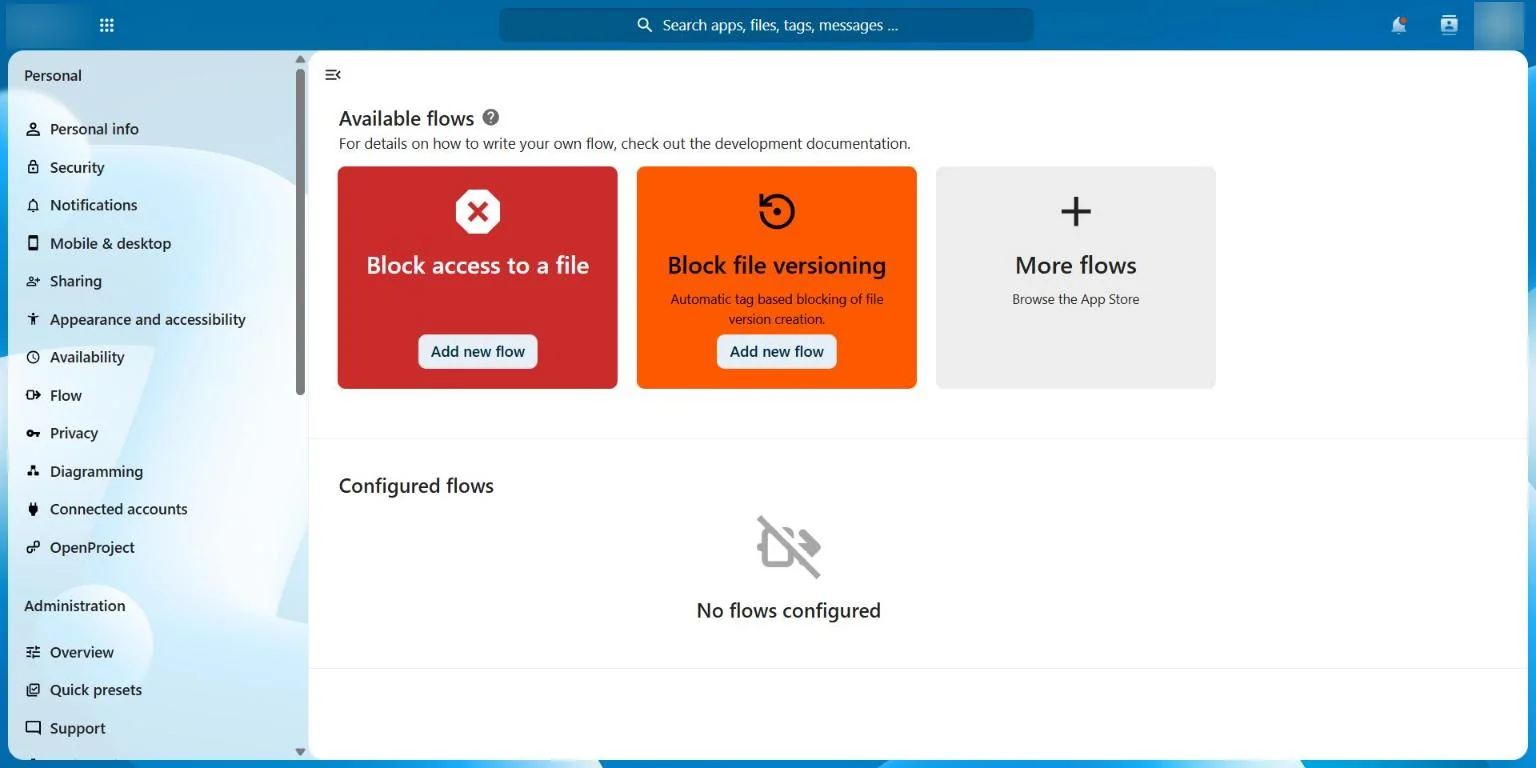
Automatic rules without programming: block access to sensitive files, prevent new versions based on tags, or add more flows when you need them.
- Rule-based blocking of file access
- Automatic tag-based blocking of new versions
- More flows available in the app store
- For example, convert to PDF when a tag is added
Controlled sharing
The administrator decides how documents can be shared: with users and groups, by link or with other clouds, with or without a password.
- Sharing with users and groups
- Password-protected share links
- Preview without allowing downloads
- Sharing limited to each user's groups

Activity log
Every change is recorded: who created, changed, shared or commented on each document, and when. It is the document's timeline, ready for audit.
- Each document's timeline
- Filters for file changes, shares, security and comments
- Your own activity and your colleagues'
- Audit trail

Communication and Collaboration
Conversations, video meetings and documents in the same system. Schedule meetings from the calendar and mention colleagues to get their attention.
- Team conversations
- Video meetings
- Mentions and message reminders
- Meetings scheduled from the calendar

Full control for the administrator
Real ISOFT DMS administration screens. Server details, addresses and log entries have been blurred.
Security and access
Brute-force protection, an allow list of addresses and two-factor authentication, which can be required for every account or for specific groups.
- Brute-force protection
- Allow list of IP addresses
- Two-factor authentication required by group
- Limits on repeated sign-in attempts

Delegated administration
Hand parts of the administration, such as support, email settings or sharing, to specific groups without giving them full access to the system.
- Administration sections delegated to groups
- Each team reaches only what it needs
- Sharing, email and background job settings
- Main administrators keep full control

Apps
Turn apps on or off to suit the organisation: activity, contacts, comments, file access control, reminders, document editing with LibreOffice and many more.
- Active and disabled apps on one screen
- Document editing with LibreOffice
- File access control
- Integrations and additional apps available

Your organisation's look
Give ISOFT DMS your organisation's look: name, web address, slogan, colours and background image, with links to the legal notice and privacy policy.
- The organisation's name and slogan
- Primary and background colours
- Links to the legal notice and privacy policy
- Visible to every user

Server monitoring
Follow the server from the panel itself: operating system, processor, memory, uptime, and load and memory charts.
- Server load chart
- Memory and swap usage
- Server uptime
- Operating system and processor details

Event log
The log reader shows system warnings and errors with their level, app and time, so the technical team can spot problems early.
- Warnings and errors by severity
- Sorting by level, app and time
- Search and filters on messages
- Log reader settings

A complete platform
ISOFT DMS is deployed and supported by iSoft.
ISOFT DMS
Create Automated Workflows
ISOFT DMS makes it easy to automate repetitive and tedious tasks and create efficient team collaboration workflows. Protect and withdraw data with advanced retention and access control features.
Automate Tasks
For example, set up a flow that converts documents to PDF when adding a tag. Or post a message in the chat room when a partner uploads files to a specific folder.
Approval & Digital Signature
Easy approval workflows allow teams to collaborate and management to sign important documents. Integration with DocuSign and LibreSign.
Set Document Retention
File retention and deletion can be controlled based on tags, ensuring legal or practical requirements for data longevity can be enforced.
All features
Search, security, document management, editing, collaboration and sharing, on one platform.
Find any document by what it says, including scanned PDFs and images.
Full-text search
Find documents by their content, not just by their name.
Dedicated search engine
Fast search, even across large volumes of documents.
File content indexing
The text of every file is indexed automatically and appears in the results.
OCR for scanned PDFs and images
Text recognition in scanned documents, so they become searchable.
Automatic OCR in workflows
Incoming PDFs get searchable text, with no manual step.
AI auto-tagging
Images and media files classified automatically by their content.
File protection, control over who has access, and records for audit.
File antivirus
Every uploaded file is scanned for viruses and malware.
Server-side encryption
Files are stored encrypted.
End-to-end encryption
Sensitive folders encrypted on the device itself: not even the server can read them.
File access control rules
Block access by group, IP address, tag or time of day.
Audit trail
User and administrator actions are recorded for audit.
Retention policies
Automatic deletion of files by tag or by age.
Password policy and brute-force protection
Rules for strong passwords and blocking of repeated sign-in attempts.
Two-factor authentication
One-time codes and physical security keys.
Single sign-on (SSO)
Sign in with the organisation's account, through OpenID Connect or SAML.
LDAP and Active Directory
Users and groups synchronised with the organisation's directory.
Suspicious login detection
An alert when an account signs in in an unusual way.
Watermarking and secure view
Documents opened with a watermark and without allowing downloads.
Versions, tags, team folders, workflows, approvals and signatures.
File versions
Version history for every file: name the important versions and restore any of them.
Trash bin
Deleted files can be recovered.
Collaborative and system tags
Classify documents with team tags or tags set by the administrator.
File locking
Manual locking and automatic locking while editing, to avoid conflicts.
Team folders with permissions
Folders shared by groups, with detailed permissions (ACLs).
Rule-based automatic tagging
Tags applied automatically when a file matches a rule.
Workflow engine
Visual rules that automate actions on files, without programming.
Automatic PDF conversion
Documents converted to PDF automatically, by rule.
Approval workflows
Document approval requests, with approve or reject.
Electronic signatures
Sign documents electronically inside the system.
Document templates
Create new documents from the organisation's templates.
External storage
Connect storage you already have: SMB, S3, SFTP and WebDAV.
Previews
Previews generated in advance, so documents open faster.
Metadata and properties
See each file's metadata and properties.
Edit documents in the browser, with several people at the same time.
Office documents in the browser
Documents, spreadsheets and presentations edited together, in real time.
Alternative document editor
A second Office document editor, if the organisation prefers it.
Collaborative text editing
Notes and text documents edited together, in real time.
Whiteboard
A shared whiteboard to draw and plan as a team.
Chat, meetings, tasks, knowledge and calendar in the same system as your documents.
Chat and video calls
Chat, calls, video and screen sharing.
Kanban boards
Organise tasks and projects in boards, lists and cards.
Team wiki
A knowledge base written together by the team.
Tables
Lightweight databases for lists and records, without programming.
Forms
Create forms and surveys and collect the answers.
Polls
Polls to set dates and decide as a team.
Notes
Personal notes, always at hand.
Calendar, contacts and email
Calendar, contacts and email in the same place.
Teams
Groups of people created by users themselves, for easy sharing.
Comments on files
Comment on documents and mention colleagues.
Activity and notifications
Follow what changes and get notifications.
Related resources
Links between related files, chats and tasks, and quick insertion of content.
AI Assistant
Summaries, translations and other AI tasks, inside the system.
Share with whoever needs it, inside and outside the organisation, under control.
Public links
With a password, an expiry date and view-only mode.
File drop
Upload-only links, without seeing the folder's contents.
Federated sharing
Sharing between different servers, for example with partners.
Guest accounts
Limited access for people outside the organisation.
Smart Storage and Retrieval
A streamlined process from start to finish. Keep documents on your own servers or on iSoft hosting: you choose where they are stored.
Easy Capture from All Sources
ISOFT DMS is the smartest home for contracts, invoices, letters, orders, proposals, meeting notes, or any other business document.
Index and Authorize
Quickly classify documents and index information with just a few clicks. Then share with controlled access rights and permissions.
Secure and Organized Archive
Each document is safe and protected in the archive with controlled access rights until it reaches its retention date.
Access and Collaborate
Find information quickly and simply; edit and comment on documents or process them in workflows.
ISOFT DMS documentation
Read online or download as PDF, in Portuguese or English.

Executive Introduction
For management: the challenge of scattered documents, what ISOFT DMS is, automation and compliance, and the benefits for the organisation.
Portuguese version
Features & Advantages Brochure
The main features by area: documents and collaboration, automation and administration, search and security, editing, collaboration and sharing.
Portuguese version
Feature Catalogue
A reference to every ISOFT DMS feature, organised by area, for technical teams.
Portuguese version